2026-08-20AI outbound sales automationChatGPT scheduled tasksAI sales development

How We Built an AI Outbound Sales Development Engine With ChatGPT Scheduled Tasks

V12 Labs22 min read
How We Built an AI Outbound Sales Development Engine With ChatGPT Scheduled Tasks - Featured image

Short answer

V12 Labs runs outbound as a staged, evidence-first system: 14 scheduled tasks discover buying signals, review and enrich accounts, draft and verify outreach, enforce approval and sending limits, monitor replies, and learn every week.

Most teams trying to automate outbound start with the email. We started with the operating system around the email.

The general outbound engine covered here uses 14 ChatGPT scheduled tasks. They find current buying signals, review accounts, enrich buyers, prepare outreach, control sending, classify replies, and manage follow-ups.

No single task owns the whole motion. Scheduled tasks wake up narrow workers, while a shared system of record carries state between them.

Evidence and status determine what can move next. Humans retain control over sensitive or ambiguous outreach.

Short answer: this is a state machine with scheduled workers, not an autonomous AI SDR.

Daily tasks handle research and preparation. Hourly tasks clear approved queues, a monitor watches replies, and a weekly task challenges the market thesis.

This article documents the general engine as it was configured on August 20, 2026, including its cadence, controls, failure modes, and the lessons we would carry into another outbound automation build.

If you would rather have V12 Labs build it, get your free build plan. We will put the scope, timeline, and price range in writing. You keep the plan, and if we build it, you own the code, data, and IP from day one.

On this page

Why we did not build one autonomous AI SDR

It is easy to write a prompt that says:

Find a company, identify the buyer, write an email, send it, and follow up.

It is also a poor production design.

That prompt combines jobs with very different error profiles. Discovery can tolerate an empty result. Qualification needs contrary evidence. Enrichment may consume credits and must resolve identity correctly.

Copywriting requires judgment about tone. Sending creates an external side effect. Reply handling can change a real relationship.

When all of that sits inside one agent, several problems become difficult to control:

  • weak research can silently contaminate the message
  • the same company can be rediscovered and contacted twice
  • a high numerical score can hide stale buying intent
  • a copy error can reach Gmail without another boundary check
  • sending limits and approval rules become prompt suggestions instead of system policy
  • nobody can tell which stage caused a bad outcome

We had already reached the same conclusion in our broader guide to AI sales automation: automate the repeated coordination work, but keep judgment and external action behind explicit controls.

The engine at a glance

The general operating map covered in this article has 14 scheduled tasks.

ChatGPT describes scheduled tasks as recurring background work that can use connected tools and skills. A run can return to an existing chat or start independently.

The official scheduled-tasks documentation recommends testing prompts manually and reviewing early runs. That matches our approach: workflow first, cadence second.

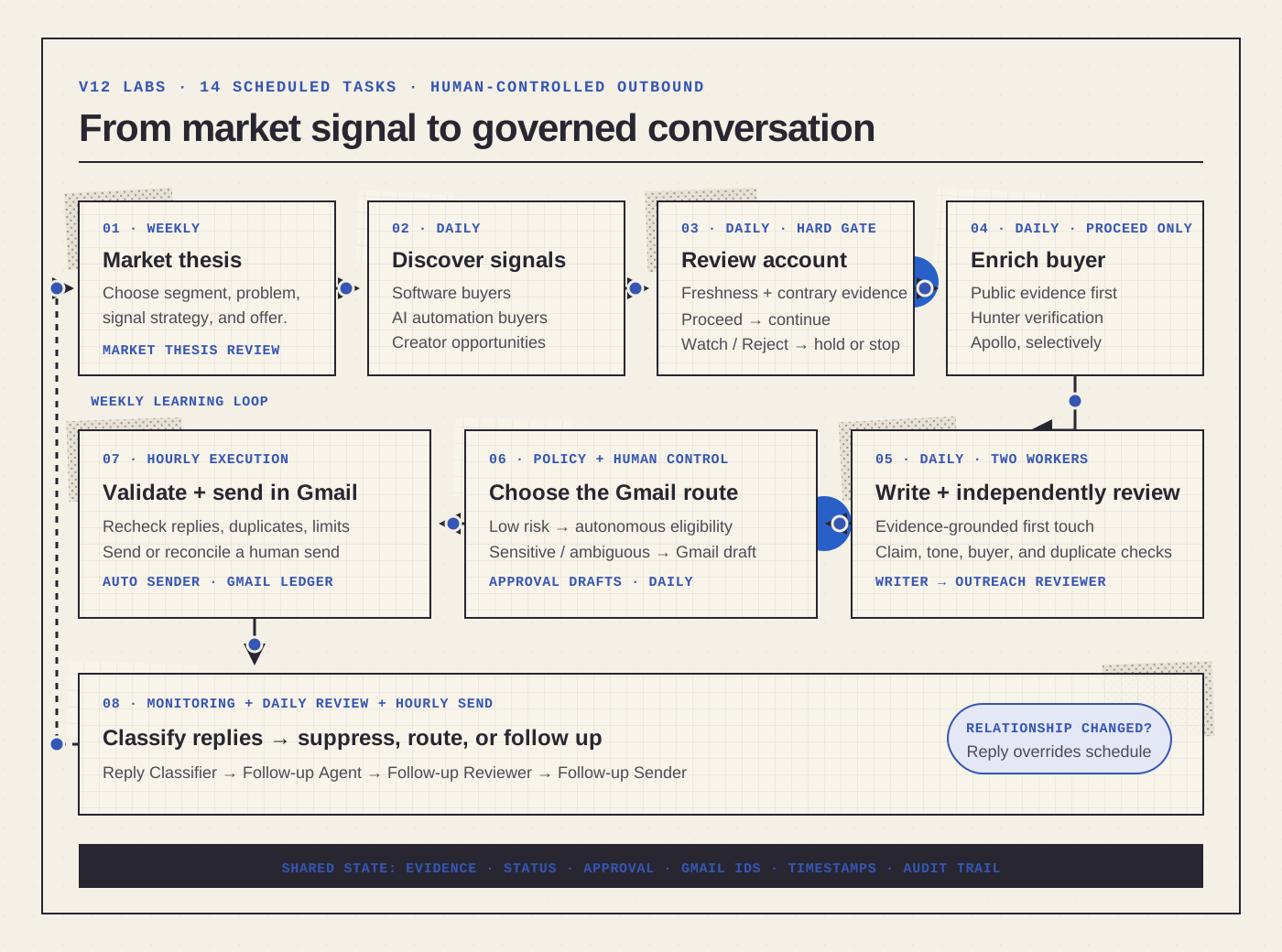
Here is our current operating map.

Flowchart of the V12 Labs outbound pipeline: weekly market thesis, daily signal discovery, account review, selective enrichment, outreach writing and review, Gmail approval and sending, reply classification, follow-up, and a weekly learning loop.

The pipeline is deliberately gated. A record advances only when its evidence and state qualify it for the next worker. Gmail facts and replies can override the planned schedule.

Open the full-size flowchart.

Scheduled task Cadence Responsibility
V12 Software Buyers Daily Find fresh signals where the smallest useful project is a broader application, portal, integration layer, or internal system
V12 AI Automation Buyers Daily Find fresh signals where the smallest useful project is a bounded recurring workflow or agent
V12 Creator Opportunities Daily Find operators with a concentrated audience and a repeatable problem that could support a partnership or validation cohort
V12 Account Reviewer Daily Re-research new candidates, find contrary evidence, apply freshness rules, and decide Proceed, Watch, Reject, or Duplicate
V12 Lead Enricher Daily Resolve likely buyers and contact routes using public evidence first, then Hunter or Apollo selectively
V12 Outreach Writer Daily Draft a small batch of evidence-grounded first-touch messages
V12 Outreach Reviewer Daily Check the draft against sources, positioning, tone, duplication, and safety rules
V12 Approval Drafts Daily Route messages that require human judgment into a Gmail draft or approval queue
V12 Auto Sender Hourly Send only records that satisfy the autonomous-send policy and remain under account-level limits
V12 Follow-up Agent Daily Identify contacted records that are due for a useful follow-up and prepare the next message
V12 Follow-up Reviewer Daily Check follow-up context, timing, thread continuity, and whether another message is justified
V12 Follow-up Sender Hourly Reconcile approved follow-ups with Gmail and send eligible messages within limits
V12 Reply Classifier Monitoring Watch for replies, classify their meaning, and route records to the right next state
V12 Market Thesis Review Weekly Review outcomes and decide whether the segment, problem, signal strategy, or offer needs to change

The headline numbers are simple: 10 daily workers, two hourly queue processors, one reply monitor, and one weekly strategy loop.

The more important point is the separation of responsibilities. Discovery does not enrich. Enrichment does not write. Writing does not approve. Approval does not automatically imply unlimited sending.

Want this built for your business?

We build custom software and AI agents that ship in weeks. You own the code, we stay for support.

Get your free build plan

Free. 30 minutes. You leave with scope, timeline, and a price range.

How work moves through the system

The workflow is easiest to understand as a sequence of gates.

1. A weekly task maintains the market thesis

Outbound quality is downstream of market selection.

If the target segment does not have an expensive recurring problem, an accessible buyer, a credible reason to act now, and a project V12 Labs can deliver well, better personalization will not save the campaign.

The weekly market-thesis task reviews what the engine is learning:

  • which discovery path produces accounts that survive review
  • which segments repeatedly end in Watch or Reject
  • which proposed wedges collide with mature incumbent software
  • where explicit buying intent appears
  • which messages earn replies
  • where procurement or compliance makes a small engagement unrealistic

This gives the system a slow strategic clock. The daily workers execute the current thesis; the weekly worker asks whether the thesis still deserves resources.

2. Three daily scouts search different opportunity surfaces

We split discovery into three lanes because the signals and the commercial motion are different.

Software Buyers looks for problems that require a broader product or internal system. Examples include portals, operations apps, integration layers, custom dashboards, and spreadsheet-to-application migrations.

AI Automation Buyers looks for narrower recurring workflows. Examples include intake, exception handling, research, reconciliation, reporting, routing, and follow-up preparation.

Creator Opportunities looks for a different distribution model. The target may be a coach, community operator, educator, or practitioner with a concentrated audience and a repeated problem.

The first offer may be a paid validation cohort or an internal delivery tool rather than cold outbound to each end customer.

Each scout uses both account-first and people-first discovery.

Account-first discovery begins with operating conditions such as expansion, technology migration, recurring administrative work, customer-experience failures, or a current process described in a company source.

People-first discovery begins with attributable intent: an operator asking for a recommendation, describing a broken workflow, seeking an implementation partner, or explaining a recurring manual process in a public community or social post.

The second path has often produced stronger opportunities because it begins with a real person expressing a real problem.

It also demands stricter identity resolution. A social post is a signal, not proof that the author is the buyer or that the company is qualified.

3. Freshness is a gate, not a scoring bonus

One of the most consequential changes we made was separating signal freshness from lead score.

A company can look perfect on paper and still be a poor outbound target if the underlying event is old. We use these working tiers:

Freshness tier Signal age How we treat it
Hot 0-7 days Preferred for explicit intent and fast-decaying requests
Fresh 8-21 days Usually usable with adequate company evidence
Aging 22-45 days Requires judgment; stronger for durable change than transient intent
Stale 46-90 days Cannot support signal-led outreach without a meaningful recent revalidation
Expired More than 90 days Historical context only; a separate current trigger is required

Explicit requests for a vendor, freelancer, tool, or agency decay particularly fast. A 35-day-old "looking for help" post is not current buying intent merely because a search engine surfaced it today.

Durable events behave differently. A facility expansion, system migration, acquisition program, or multi-location rollout can remain relevant longer, but we still look for current corroboration before treating it as an active trigger.

This rule prevents a common outbound failure: giving an old signal a high score and allowing the score to launder the staleness.

4. The account reviewer tries to disprove the opportunity

The scouts are optimized to find plausible opportunities. The reviewer is optimized to challenge them.

For every new or materially changed record, the account reviewer checks:

  • Is the source current and attributable?
  • Is the problem observed, or merely inferred from the industry?
  • Is there a narrow project we could deliver in weeks rather than a vague transformation?
  • Does an incumbent product already solve the proposed wedge?
  • Does the company have an internal team that owns the exact capability?
  • Is the likely buyer accessible?
  • Would procurement, security, or compliance overwhelm a small initial project?
  • Is there contrary evidence that should kill the hypothesis?

It then returns one of four operational decisions:

  • Proceed: enough evidence, fit, timing, and whitespace to justify enrichment
  • Watch: promising, but a named evidence gap must be resolved before spending more resources
  • Reject: a fatal problem such as stale intent, incumbent overlap, weak economics, or poor delivery fit
  • Duplicate: the account already exists elsewhere in the system

This adversarial step is why the engine can produce zero usable accounts on a run and still be working correctly. We would rather preserve an empty queue than manufacture pipeline from weak evidence.

5. Enrichment happens only after qualification

Contact data is not free, and the cost is not limited to API credits. A wrong buyer wastes research, produces awkward personalization, and can create reputational damage.

The lead enricher therefore works only on reviewed accounts. Its job is to:

  • identify the likely buying role
  • resolve a real person to the company with public evidence
  • find a source-backed public contact route
  • record uncertainty or conflicts rather than silently choosing one identity
  • avoid spending enrichment credits on Watch or Reject records

This is the same principle behind AI account research automation: assemble evidence into a usable brief, retain source links, and let missing evidence remain missing.

Where Hunter and Apollo fit

We do not ask Apollo or Hunter to decide which companies deserve outreach. That decision has already passed through signal discovery and account review.

The enrichment tools answer a narrower question: given a qualified company and a likely buyer, can we resolve a current professional identity and a contact route with enough confidence to use it?

Our practical enrichment waterfall is:

  1. Check the company site, public team pages, the buyer's public profile, and other attributable sources.
  2. Confirm that the person still holds the relevant role and that the company domain is correct.
  3. Use Hunter to search the domain or named person and verify a professional email when the public route is incomplete.
  4. Use Apollo selectively when the account is valuable enough to justify a paid enrichment lookup or when another provider cannot resolve the record.
  5. Compare provider results with the public evidence rather than accepting the first returned address.
  6. If the identity or address remains uncertain, leave email blank and use a supported public route—or do not contact the account.

Hunter's Domain Search can return professional contacts associated with a company domain.

Its Email Verifier reports whether an address is valid, accept-all, or unresolved. In the runs we reviewed, Hunter resolved named buyers when a direct public route was missing.

We record that verification result. A returned address is not automatically safe to use.

Apollo's People Enrichment can match a person from a name, company domain, or email. Depending on the returned data, it may consume credits.

Apollo therefore sits late in the waterfall. We reserve it for reviewed accounts where wider coverage is worth the cost.

The enrichment run we reviewed used Hunter fallbacks but consumed no paid Apollo credits. Apollo is an escalation path, not a dependency or a claim that every lead was enriched there.

The providers improve coverage, but they do not become the source of truth. We persist:

  • the person and current role we intended to reach
  • the company and normalized root domain
  • the provider used
  • the returned email and verification status
  • public sources supporting the identity match
  • any conflicting title, company, or domain evidence
  • the date the route was checked

This catches an easy-to-miss failure mode: a tool can return a deliverable address for the right person at the wrong company. Deliverability alone does not make the route relevant.

6. Writing and reviewing are separate jobs

The outreach writer receives a qualified record, its evidence, the proposed problem, the project wedge, and the likely buyer context. It does not start from a bare company name.

The writer produces a concise first-touch message grounded in observed facts. It avoids pretending that we know the prospect has a specific problem when the evidence only supports a question.

The outreach reviewer then checks the message independently:

  • Does every material claim trace back to evidence?
  • Does the message distinguish observation from inference?
  • Is the proposed wedge relevant to the cited trigger?
  • Is it written to the right person and company?
  • Is it concise, natural, and free of generic AI phrasing?
  • Does it avoid sensitive or regulated claims?
  • Has this person or account already been contacted?
  • Should the message be auto-send eligible, human approval only, revised, or rejected?

This separation lets us measure draft acceptance and find where quality is breaking. If the reviewer rejects many drafts for weak positioning, the fix belongs upstream in research or thesis design, not in the Gmail sender.

7. Approval policy decides the route to Gmail

Not every message carries the same risk.

The engine can route low-risk, fully evidenced records through a stricter autonomous-send policy. Ambiguous, strategically important, or sensitive records go to human-reviewed Gmail drafts.

The approval layer also creates a valuable learning signal. Human edits reveal more than whether a draft was technically valid. They show whether the tone, angle, ask, or account choice felt right.

The system should retain that decision as structured feedback. Otherwise the writer will repeat the same mistake tomorrow.

Gmail is both the action layer and the execution ledger

Gmail is not connected as a simple final send email tool. The integration closes the loop between planned pipeline state and what actually exists in the mailbox.

For human-review records, the approval task creates a Gmail draft and confirms that it remains unsent with the DRAFT label.

It writes the Gmail draft, message, and thread identifiers back to the record. A reviewer can inspect the recipient, subject, body, and thread context before sending from Gmail.

For autonomous-eligible records, the sender still re-reads Gmail. It checks for an existing message or reply, validates the address and body, and confirms that the shared cold-send ceiling has capacity.

After a send, the next reconciliation pass does not trust the spreadsheet's planned state. It reads Gmail's actual SENT message and captures its timestamp and identifiers.

Only then does it update Last Contacted, Pipeline Status=Sent, and Lifecycle Stage=Contacted.

A Gmail draft and its sent message are not the same object. Google's draft documentation says sending removes the draft and creates a sent message with a new ID.

Persisting draft and thread context lets the workflow reconcile a message that a human sent manually instead of losing it between systems.

The Gmail integration therefore supports six distinct operations:

  1. Create: create a real draft for a human-approved message.
  2. Validate: confirm recipient, subject, paragraph formatting, draft label, and unsent state.
  3. Reconcile: detect when a human has sent a draft and write the actual Gmail event back to the pipeline.
  4. Send: deliver only an auto-approved message that still passes every last-mile check.
  5. Monitor: read new thread activity and classify replies, referrals, objections, out-of-office messages, and opt-outs.
  6. Suppress: stop pending first touches or follow-ups when Gmail shows that the relationship state has changed.

Gmail is the authority for mailbox facts. If the sheet says Approval Draft Ready but Gmail shows a sent message, the system reconciles the record to Sent.

A Gmail reply, opt-out, or active human conversation also overrides a scheduled follow-up.

8. Hourly senders clear queues without creating demand

Our senders run hourly, but that does not mean they send every hour.

Their job is to reconcile the approved queue with the actual mailbox and current account state. Before sending, they recheck conditions such as:

  • approval state is still valid
  • the account has not replied since the draft was prepared
  • the message is not a duplicate
  • the daily account or mailbox ceiling has not been reached
  • required address and thread data are present
  • formatting is valid at the final Gmail boundary
  • Gmail does not already contain the same send or a newer human-owned conversation

When nothing is eligible, the correct output is no send.

This distinction matters. The hourly cadence reduces latency after approval; it does not authorize the sender to invent more volume.

9. Replies and follow-ups use a separate loop

First-touch outbound and follow-up are different workflows.

The reply classifier monitors for responses and assigns an operational meaning: interested, referral, objection, timing issue, unsubscribe, wrong person, automated response, or another state that needs human interpretation.

The follow-up agent runs daily to find contacted records that are due. A reviewer checks whether another message is justified and continues the existing context.

The hourly follow-up sender clears only the approved, due queue.

Separating these stages prevents a dangerous pattern: a timer firing a follow-up even though a reply, referral, or opt-out changed the relationship.

Out-of-office messages are not ordinary non-replies. A return date can suppress follow-up until the person is available, while a referral can transfer the thread to a new buyer.

A clear "stop" becomes a permanent do-not-contact state. A manual human reply makes the thread human-owned and removes it from cold automation.
The shared sheet is a queue, not just a lead list

Scheduled tasks do not pass reliable state by hoping the next chat remembers the previous one. The shared sheet is the operational contract between workers.

At a minimum, each record needs:

  • a detailed pipeline status
  • a simpler lifecycle stage for reporting
  • last checked timestamp
  • last contacted timestamp sourced from an actual send
  • an outreach angle
  • source URLs and evidence notes
  • an append-only audit trail of material decisions

The detailed pipeline status is authoritative. Lifecycle stage is only a summary such as New, Reviewed, Contacted, Replied, Qualified, or Not Fit.

That distinction keeps the funnel readable without discarding operational detail. "Reviewed" is not enough for a worker deciding what to do next.

It needs to know whether the record is Proceed, Watch, awaiting enrichment, draft ready, approval required, send eligible, follow-up due, or blocked.

Workers locate fields by exact header name rather than fixed spreadsheet columns. This prevents a column insertion from redirecting writes.

Legacy fields remain read-only history, not alternate sources of truth.

The production bug that changed our design

One of our most useful failures looked trivial: an outreach email reached Gmail with hard line breaks inserted inside sentences.

The writer had visually wrapped text. The downstream tasks preserved those newline characters. The final email looked fragmented and machine-generated.

Fixing only the writer would have been incomplete. Any upstream model, copied draft, or legacy queue item could still contain the same defect.

We added normalization at multiple boundaries:

  • outreach writer
  • outreach reviewer
  • human Gmail draft preparation
  • autonomous sender
  • follow-up writer
  • follow-up reviewer
  • follow-up sender

The final mailbox boundary now collapses accidental single newlines inside sentences, preserves intentional blank lines between paragraphs, removes repeated spaces, and refuses to send malformed copy it cannot repair safely.

The lesson is broader than email formatting:

validate important invariants again at the last side-effect boundary.

Upstream validation improves quality. Final-boundary validation protects reality.

What the cadence is really doing

The schedule is not a substitute for orchestration. It provides clocks for different kinds of work.

Daily research matches the pace at which buying signals change. Constant full-web research would be noisy and expensive.

Hourly senders reduce latency for approved queues without continuous polling. Reply monitoring is more responsive because a new reply can invalidate a pending follow-up.

Market strategy changes more slowly. A weekly review can identify patterns without overreacting to one run.

The workers are staggered rather than launched as one giant batch. State determines whether a record is eligible for the next step.

If review is incomplete, enrichment skips it. If enrichment is incomplete, writing skips it. If a draft is unapproved, the sender skips it.

That creates backpressure naturally. A failure in one stage leaves a visible queue instead of pushing a half-complete record into the next stage.

What we measure

Email volume is one of the least useful metrics on its own.

We care about stage quality and downstream outcomes:

  • fresh signals found by source type
  • account-first versus people-first discovery yield
  • percentage of candidates that become Proceed, Watch, or Reject
  • stale or expired signals rejected
  • duplicate accounts prevented
  • enrichment success and identity conflicts
  • enrichment-provider match rate, verification quality, and credits spent per Proceed account
  • draft acceptance, revision, and rejection rate
  • human approval edits by reason
  • sends blocked by limits or state conflicts
  • Gmail draft-to-sent reconciliation accuracy
  • reply rate and positive-reply rate
  • referrals, objections, opt-outs, and wrong-person responses
  • follow-ups suppressed because the relationship changed
  • qualified conversations and projects created

The weekly thesis review should read these as a connected funnel. A low reply rate may be a copy problem, but it may also originate in stale signals, weak qualification, the wrong buyer, or a project wedge that does not match the trigger.

What we would build first for another team

We would not begin with all 14 tasks.

A useful first version has five stages:

  1. Signal scout: finds current, attributable reasons an account might care.
  2. Account reviewer: challenges the evidence and records Proceed, Watch, or Reject.
  3. Enricher: resolves the buyer only for Proceed accounts.
  4. Writer and reviewer: prepares a source-grounded draft and checks it independently.
  5. Human approval queue: creates a reviewable Gmail draft without automatic sending.

Run that manually until the definitions stabilize. Review where records get stuck. Capture rejection reasons. Only then add scheduled runs, autonomous send eligibility, reply classification, and follow-up automation.

This follows a useful rule from the official scheduled-tasks guidance: test the prompt as ordinary work first, then schedule it once the workflow is predictable.

If the system still requires frequent steering, the method is not ready to be hidden behind a timer.

What ChatGPT scheduled tasks do well—and what they do not solve

Scheduled tasks are useful for giving repeatable agent workflows a reliable cadence. They can return to existing context, use connected tools, and run narrow prompts in the background.

They do not automatically provide:

  • a clean domain model for leads and interactions
  • deduplication across every data source
  • a trustworthy approval policy
  • mailbox reputation management
  • legal compliance for every market and jurisdiction
  • an attribution model for revenue
  • durable learning from human edits

Those are product and operating-system problems.

For a small team, a governed sheet can serve as the initial state layer.

As complexity grows, the next step is an application with typed records, event history, idempotent jobs, explicit permissions, and observable workflow runs.

This pattern follows the production principles in what an AI workflow system is.

It also connects to our lessons from production AI agent architecture.

The principles we would keep

After operating this system, these are the rules we would keep even if every tool changed:

  • Start with a painful workflow and a current signal, not a giant contact list.
  • Treat freshness as a hard gate for fast-decaying intent.
  • Preserve exact sources and separate observed facts from inference.
  • Use independent review to search for contrary evidence.
  • Spend enrichment resources only after account qualification.
  • Keep discovery, review, enrichment, writing, approval, and sending separate.
  • Let zero-result runs succeed.
  • Make state transitions explicit and auditable.
  • Recheck invariants at the final external-action boundary.
  • Make opt-outs, replies, limits, and human decisions override the schedule.
  • Use weekly outcomes to revise the market thesis, not just the copy.

The purpose of an AI outbound engine is not to make sending effortless.

It is to make good judgment repeatable without making bad judgment scalable.

FAQ

How many scheduled tasks run in the V12 Labs outbound engine?

This article covers 14 tasks in the general outbound engine as of August 20, 2026: 10 daily tasks, two hourly senders, one reply monitor, and one weekly market-thesis review.

Why not use one AI SDR agent for the whole workflow?

Discovery, qualification, enrichment, writing, sending, and replies carry different risks. Splitting them makes each stage easier to verify, measure, stop, and improve.

It also prevents weak research from flowing directly into an external message.

Does the engine send every approved email automatically?

No. Records must still pass policy, state, duplicate, reply, formatting, and account-limit checks.

Sensitive or ambiguous messages remain human approval only. An hourly sender can correctly complete a run with zero sends.

How do Apollo and Hunter work inside the outbound engine?

They are downstream enrichment tools, not qualification engines. Hunter searches and verifies professional routes for an identified buyer.

Apollo is a selective escalation when a reviewed account justifies paid lookup. Public evidence still determines whether a result is safe to use.

What does the Gmail integration automate?

It creates and validates approval drafts, sends policy-approved messages, and reconciles manual sends with real timestamps and thread identifiers.

It also monitors replies, counts sending volume, and suppresses automation when an opt-out, referral, out-of-office message, or human-owned conversation changes the state.

What is the most important lead-scoring rule?

Freshness is not just another score component. Fast-decaying intent can become unusable even when company fit is high. Older transient signals require current revalidation before they can support outreach.

Can a team build this with a spreadsheet?

Yes, for an early controlled workflow. Use canonical fields, explicit statuses, evidence links, timestamps, and an append-only audit trail.

Move to a database-backed application when concurrency, permissions, reporting, idempotency, or learning becomes difficult to manage.

Where should a team start?

Start with signal discovery, independent account review, selective enrichment, a writer-reviewer pair, and human-approved Gmail drafts. Schedule the workflow only after it produces predictable, reviewable results manually.

Where V12 Labs fits

V12 Labs builds AI workflow systems for revenue and customer operations.

That includes the unglamorous parts that make an agent useful in production: canonical state, evidence capture, approvals, exception handling, integrations, monitoring, and feedback loops.

If your team is considering an AI outbound engine, start by mapping the path from signal to conversation.

Then automate the narrow stages where speed and consistency matter without giving up control. Learn more about our AI workflow systems offering.

Where this fits

Get a clear plan before you spend.

V12 Labs will put the scope, timeline, and price range in writing. If we build it, you own the code, data, and IP from day one.

Related reading

AI Sales Automation: What B2B Teams Should Automate First

Most B2B teams do not need a fully autonomous AI SDR. They need AI sales automation that handles research, qualification, follow-up, and CRM upkeep without breaking the human parts of selling.

Production AI Agent Architecture: Lessons From Building CrewKit

Why most multi-agent systems break in production, and the architecture we built instead. The Mind, the durable primitives, the learning loop, and the anti-patterns we ran into the hard way.

Bland.ai + Twilio Integration: How We Built Production AI Phone Agents

How Bland.ai and Twilio work together for production AI phone agents, where ElevenLabs-style voice stacks fit, and what teams still need to build.

Graph Engineering, Explained: Why AI Agent Systems Are Moving Beyond One Loop

Graph engineering is the emerging practice of designing how agents, tools, validators, and humans coordinate across branches, parallel work, shared state, and recovery paths. Here is what is real, what is renamed workflow orchestration, and when a graph is actually worth building.

Loop Engineering, Explained: What It Is, What's Overhyped, and Where It's Going

Loop engineering went from an unknown phrase to the AI industry's biggest buzzword in about a week. Here's what it actually means, where the backlash has a point, and where the practice goes from here.

Stop Botsitting AI Agents: Build AI Workflow Systems Instead

Botsitting AI agents creates hidden supervision work. Revenue teams need AI workflow systems with context, integrations, approvals, monitoring, and clear ownership.

Get a build plan